
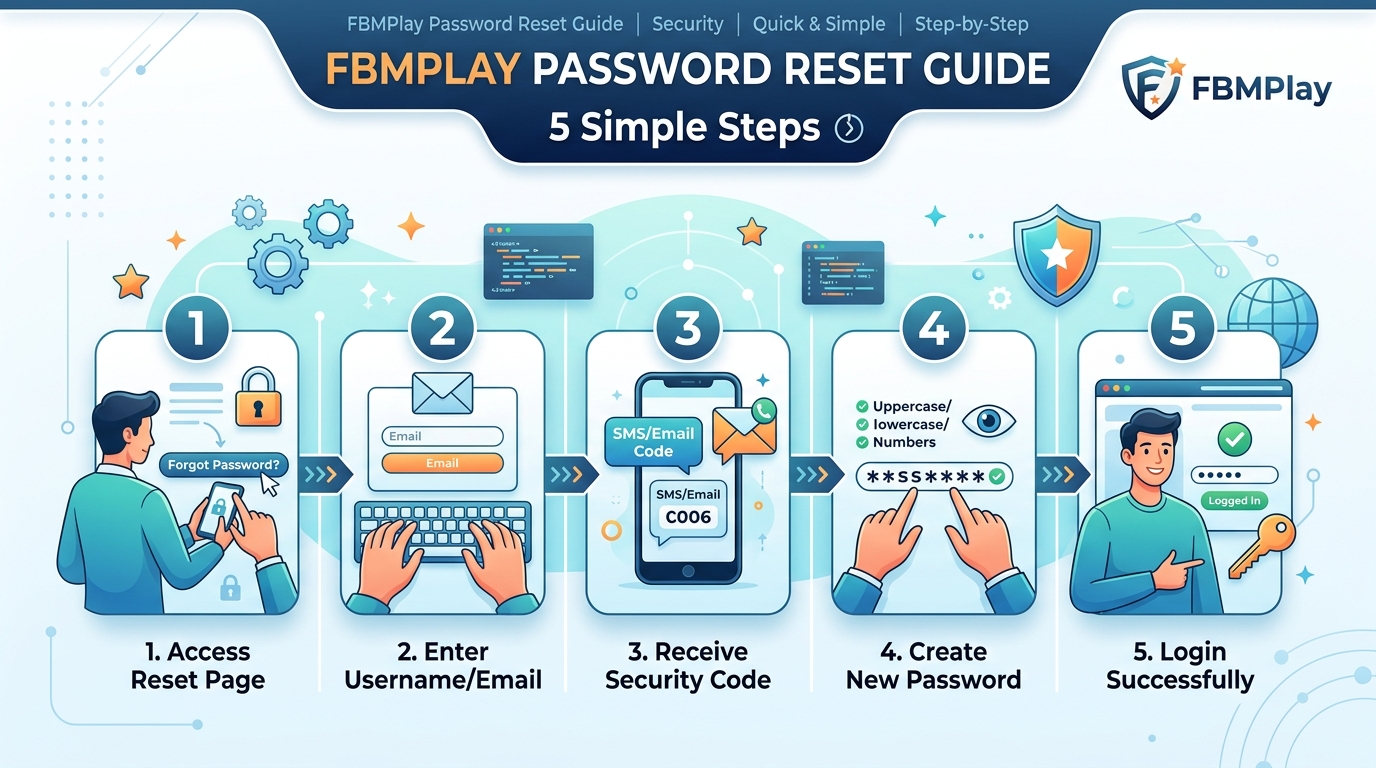
FBMPlay Password Reset Guide: 5 Simple Steps
Forgot your FBMPlay password? Reset it in 5 simple steps via SMS OTP to your Philippine mobile number. PAGCOR-regulated security at fbmplay.com. For Filipino players 21+.
When to Reset Your FBMPlay Password
Maintaining account security is critical for real-money gaming. You should initiate an FBMPlay password reset if you encounter any of the following scenarios:
- You forgot your password: The most common reason. Do not attempt to guess more than a few times to avoid account lockouts.
- You suspect unauthorized access: If you notice unusual balance changes or unrecognized login locations, reset immediately.
- You haven't logged in for 60+ days: Updating credentials after a long absence ensures compliance with updated security protocols.
- You used a shared or lost device: If you previously logged in on a public computer or lost your mobile phone, a reset forces all active sessions to terminate.
- Routine security maintenance: We strongly recommend updating your password every six months.
If you suspect your account has been compromised, reset your password immediately and contact LiveChat for further assistance.
How to Reset FBMPlay Password: 5-Step Guide
FBMPlay uses a secure, SMS-based One-Time Password (OTP) system. Follow these steps to regain access to your account.
Step 1: Go to the FBMPlay Login Page
Navigate to the official fbmplay.com website on your mobile or desktop browser, or open the FBM Play app. Tap the "Login" button located at the top right of the screen. For detailed login instructions, see our FBMPlay login guide.
Step 2: Tap "Forgot Password?"
Look directly below the standard login form fields. Tap the "Forgot Password?" link. This action will redirect you to the official password recovery form.
Step 3: Enter Your Registered Mobile Number
Provide the exact Philippine mobile number you used during registration. Ensure you use the correct country code format (+63 9XX XXX XXXX). Tap the "Send OTP" button.
Step 4: Receive and Enter OTP
An OTP will arrive via SMS within 60 seconds. Enter the 6-digit code into the verification field and tap "Verify". Note that FBMPlay does not support email-based resets.
Step 5: Set Your New Password
Enter a new, strong password that meets all system requirements. Confirm the password by typing it a second time. Tap "Reset Password". You will be redirected to the login page to sign in with your new credentials.
FBMPlay Password Requirements
To protect your funds and personal data, FBMPlay enforces strict password complexity rules. A valid password must include:
- Minimum of 8 characters in length.
- A mix of uppercase and lowercase letters.
- At least one numeric digit (0-9).
- At least one special character (e.g., !, @, #, $, %, ^, &, *).
- Cannot match your registered mobile number.
- Cannot contain your birthdate or sequential numbers.
- Cannot be common words like "password" or "fbmplay".
Strong Password Examples
FBMPlay2026!Manila_Casino#9MyG@me2026
Weak Passwords to Avoid
password12309171234567qwertyfbmplay
Common FBMPlay Password Reset Issues
If you encounter friction during the reset process, consult these common troubleshooting solutions.
Issue 1: OTP Not Received
Causes: Network provider delays, incorrect mobile number entry, or SMS filtered to a spam folder.
Solutions: Wait at least 90 seconds before requesting a new code. Verify your mobile number. Try switching from Wi-Fi to a mobile data connection. For comprehensive troubleshooting, read our guide on what to do if FBMPlay OTP is not received.
Issue 2: "Mobile Number Not Registered"
Causes: A typo in the number provided, or attempting to use a secondary mobile number not linked to your account.
Solutions: Double-check the number format. Try other mobile numbers you own. If you cannot remember your registered number, contact LiveChat with your KYC documents.
Issue 3: Maximum Reset Attempts Reached
Causes: Exceeding 5 failed reset attempts within a 24-hour window triggers a security lockout.
Solutions: You must wait 24 hours for the system limit to clear, or contact LiveChat to request a manual administrative reset.
Issue 4: New Password Not Accepted
Causes: The proposed password fails to meet the mandatory complexity requirements.
Solutions: Review the requirements above. Ensure you have included an uppercase letter, a number, and a special character.
Issue 5: Reset Successful But Still Can't Login
Causes: Outdated browser cache, pending app updates, or a flagged account.
Solutions: Clear your browser cache and cookies. Restart your device. Attempt to log in using an incognito or private browsing window. If the issue persists, contact support.
After Resetting: Critical Actions
Securing your account does not end the moment you hit "Reset". Take these immediate post-reset actions:
1. Update Password on All Devices
You must manually re-log into the FBM Play mobile app, desktop browser, and any tablets you use. Update any saved passwords in your browser (Chrome, Safari) or dedicated password manager.
2. Review Recent Account Activity
Navigate to your transaction history. Look for any unauthorized deposits, bets, or withdrawal requests. Report suspicious activity to LiveChat immediately to freeze your funds.
3. Enable Additional Security
If available, turn on Two-Factor Authentication (2FA) and SMS login alerts. Review your active device verification settings.
4. Update Connected Services
Ensure that shared devices no longer auto-fill your old credentials. Never use the "remember password" feature on a device that others can access.
Password Security Best Practices
Protecting your account is a shared responsibility. Adhere to these guidelines to maintain FBMPlay personal data safety.
Do's:
- Use a unique password exclusively for FBMPlay. Do not reuse credentials from social media or banking sites.
- Change your password every 6 months.
- Use a reputable password manager to generate and store complex strings.
- Log out completely from shared or public devices.
- Keep your physical mobile phone secured with a PIN or biometric lock.
Don'ts:
- Never share your password with anyone, including individuals claiming to be FBMPlay staff.
- Never use simple, predictable passwords.
- Never write your passwords on exposed paper.
- Never let friends or family use your account to play.
Why FBMPlay Uses SMS-Based Reset
FBMPlay explicitly does not use email for password resets. Our SMS-based OTP system adheres to strict PAGCOR regulatory standards for several reasons:
- Mobile-First Design: With 96% of Filipino players accessing the platform via mobile, SMS provides the most direct and reliable communication channel.
- Two-Factor Protection: SMS verifies that you have physical possession of the registered device, adding a tangible layer of security.
- PAGCOR-Mandated KYC: Your mobile number is directly linked to your verified identity documents. Reference: PAGCOR Regulatory Framework.
- Anti-Fraud Measure: Email accounts are frequently compromised. SMS routing prevents bad actors with your email password from accessing your casino funds.
- AML Compliance: Strong, device-bound identity verification is required for Anti-Money Laundering compliance.
What If I Lost My Registered Mobile Number?
If you no longer possess the SIM card linked to your account, you cannot use the automated reset tool. You must undergo manual account recovery.
Option 1: Contact LiveChat
Connect with a support agent and provide your User ID. You will be asked to present your original identity verification documents and proof of ownership for your new mobile number. Once verified, support will update your profile.
Option 2: KYC Re-Verification
You may need to submit fresh Know Your Customer (KYC) documents. This process typically takes 24 to 72 hours. During this period, your account access remains restricted, but your existing balance is entirely preserved. For full details, read our FBMPlay account recovery guide.
Anti-Phishing: Real FBMPlay Password Reset
Player security is paramount. You must be able to identify legitimate password reset procedures to avoid phishing scams. Read more about platform authenticity in our is FBMPlay legit guide.
The ONLY legitimate FBMPlay password reset happens:
- On fbmplay.com directly: Initiated by you through the official login page.
- Via your registered mobile number: Receiving an OTP directly via SMS.
- By YOU only: Never initiated by a third party.
Watch out for these red flags:
- Emails claiming to be from FBMPlay asking you to reset your password (we do not use email resets).
- Phone calls from "agents" asking for your password or OTP.
- Social media direct messages offering recovery services.
- Third-party websites claiming to unlock your account.
When to Contact FBMPlay Support
If the self-service reset fails, our support team is ready to help. Contact FBMPlay customer service if:
- You have lost access to your registered mobile number.
- You suspect unauthorized account access.
- You have reached the maximum reset attempts.
- The OTP system is consistently failing.
How to Contact: Use the 24/7 LiveChat feature (red button at the bottom-right of fbmplay.com) or call (02) 8248-9568. Be prepared to provide your User ID, registered mobile number, and a screenshot of any error messages.
Eligibility for Password Reset
To successfully reset your FBMPlay password, you must:
- Have an active, non-banned FBMPlay account.
- Have physical access to your registered Philippine mobile number.
- Be 21 years of age or older (PAGCOR mandate).
- Be physically located within the Philippines.
Responsible Play Reminder
While we want you to regain access to your account swiftly, being locked out can sometimes cause frustration. Password reset stress can occasionally signal underlying gaming anxiety. If you feel panicked about logging in, take this brief lockout as a natural pause. The reset process can wait. Utilize our FBMPlay deposit limits and responsible gaming tools to manage your play healthily once you log back in.
Frequently Asked Questions
How do I reset my FBMPlay password?
Go to the fbmplay.com login page, tap "Forgot Password?", enter your registered mobile number, input the 6-digit SMS OTP, and create a new password.
How long does FBMPlay password reset take?
The automated SMS process takes 2 to 3 minutes to complete. If you require manual KYC verification due to a lost number, it may take 24 to 72 hours.
What if I don't receive the OTP?
Wait 90 seconds, ensure your mobile signal is strong, and check that you entered the correct number. You can request a new OTP up to 5 times per day.
Can I reset password via email?
No. FBMPlay strictly uses SMS-based OTP for password resets to comply with PAGCOR security and KYC standards.
What if I lost access to my registered mobile number?
You must contact LiveChat support and undergo a KYC re-verification process to bind a new mobile number to your account.
Can FBMPlay support change my password?
Support agents cannot see or manually set your password. They can only issue a secure reset link or update your mobile number after verifying your identity.
How often should I change my FBMPlay password?
For optimal account security, we recommend changing your FBMPlay password every 6 months and immediately if you suspect any unauthorized access.